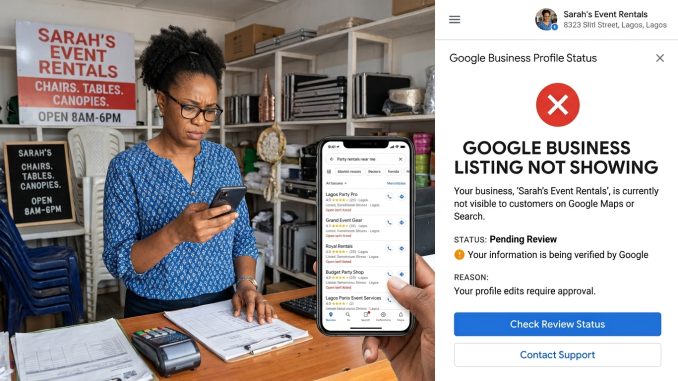
You created your Google Business Profile, completed the verification process, and expected customers to start finding your business on Google Search and Google Maps. But when you search for your business—or the services you offer—your listing is nowhere to be found.
If you’re asking, “Why is my Google Business listing not showing?”, you’re not alone. It’s one of the most common questions business owners have after creating or updating their Google Business Profile.
The good news is that your listing isn’t necessarily gone. In many cases, there’s a specific reason it’s not appearing, and most issues can be resolved.
This guide explains the most common reasons why a Google Business listing doesn’t show up and what you can do to fix it.
1. Your Google Business Profile Hasn’t Been Verified
One of the most common reasons a listing doesn’t appear is that it hasn’t been verified.
Verification tells Google that your business is legitimate and that you’re authorized to manage the profile.
Until verification is complete, your business may have limited visibility or not appear publicly at all.
How to Fix It
- Sign in to your Google Business Profile.
- Check your verification status.
- Complete any outstanding verification steps, such as video verification or another method offered by Google.
- Wait for Google to finish reviewing your verification.
2. Your Profile Is Still Under Review
Even after verification, Google may review your profile before displaying it in Search or Maps.
This often happens with:
- New businesses
- Businesses that recently changed their address
- Category changes
- Ownership transfers
- Significant profile edits
How to Fix It
Be patient and avoid making repeated changes while Google is reviewing your listing.
3. Your Business Is Too New
New Google Business Profiles rarely rank immediately.
Google needs time to:
- Verify your information.
- Understand your business.
- Compare it with other businesses.
- Build confidence in your listing.
How to Fix It
Continue improving your profile by adding photos, services, products, and responding to reviews while you wait.
4. You’re Searching from the Wrong Location
Google’s local search results depend heavily on where the searcher is located.
For example, if your business serves customers in Dallas, someone searching from Houston may not see your listing for the same search.
How to Fix It
Search from your target service area or ask someone nearby to check whether your listing appears.
5. You’re Using the Wrong Search Terms
Many business owners search only for their business name.
Customers often search using services instead, such as:
- Emergency plumber
- Family dentist
- Wedding photographer
- Coffee shop near me
If your profile isn’t optimized for the services you offer, Google may not consider it relevant for those searches.
How to Fix It
Complete your business description, services, products, and categories so Google better understands your business.
6. Your Business Category Is Incorrect
Your primary category is one of the strongest signals Google uses to determine when to show your business.
Choosing the wrong category can reduce your visibility.
How to Fix It
Review your primary and secondary categories and make sure they accurately describe your business.
7. Your Profile Is Incomplete
An incomplete Business Profile gives Google less information to work with.
Missing information can include:
- Business hours
- Phone number
- Website
- Services
- Products
- Photos
- Business description
How to Fix It
Complete every relevant section of your profile.
From my experience helping businesses improve their online presence, complete profiles generally perform much better than those with missing or outdated information.
8. Your Business Was Suspended
A suspended Google Business Profile will usually stop appearing publicly.
Suspensions can happen for several reasons, including policy violations or verification issues.
How to Fix It
Check your Google Business Profile dashboard for suspension notifications and follow Google’s reinstatement process if necessary.
9. Your Information Doesn’t Match Across the Web
Google compares your business information with other online sources.
If your:
- Business name
- Address
- Phone number
are inconsistent across your website and online directories, Google may have less confidence in your listing.
How to Fix It
Make sure your business information is consistent everywhere it appears online.
10. Your Website Isn’t Helping Your Local SEO
Although a Google Business Profile can appear without a website, having a well-optimized website strengthens your local presence.
Your website should clearly include:
- Your business name
- Address or service area
- Phone number
- Services
- Location-specific information
The more consistent the information, the easier it is for Google to understand your business.
11. You Have Very Few Reviews
Reviews help establish trust and contribute to your profile’s prominence.
If competing businesses have significantly more genuine reviews, they may rank higher.
How to Fix It
Encourage satisfied customers to leave honest reviews and respond to them professionally.
Never purchase fake reviews or offer incentives in exchange for positive feedback.
12. Your Business Is in a Competitive Area
Sometimes your profile is visible—it just isn’t ranking highly enough to appear for competitive searches.
Industries like:
- Lawyers
- Plumbers
- Dentists
- Real estate agents
often have intense local competition.
How to Fix It
Focus on gradually improving your profile rather than expecting overnight results.
13. You Recently Made Major Changes
Significant edits can temporarily affect visibility.
Changes that may trigger additional review include:
- Business name
- Address
- Primary category
- Ownership
- Verification details
How to Fix It
Allow Google time to review the changes before making further edits.
14. You’re Expecting Immediate Rankings
Many business owners believe that creating a Google Business Profile automatically guarantees visibility.
In reality, local SEO takes time.
Building visibility requires:
- Accurate information
- Regular updates
- Customer engagement
- Reviews
- A strong website
- Consistency
Think of your profile as a long-term marketing asset rather than a one-time setup.
15. There May Be a Technical Issue
Occasionally, Google experiences temporary delays or technical problems that affect listings.
If everything appears correct but your listing still isn’t showing after a reasonable period, check the Google Business Profile Help Community or contact Google support.
How to Improve Your Chances of Appearing in Google Search
If your listing isn’t showing, work through this checklist:
✔ Verify your Business Profile.
✔ Complete every section of your profile.
✔ Choose accurate business categories.
✔ Add high-quality photos.
✔ Write a helpful business description.
✔ Add products and services.
✔ Encourage genuine customer reviews.
✔ Respond to reviews.
✔ Keep your business hours updated.
✔ Ensure your website matches your Business Profile information.
✔ Check that your business information is consistent across online directories.
✔ Update your profile regularly.
Small, consistent improvements often produce better long-term results than making large changes all at once.
Frequently Asked Questions
How long does it take for a new Google Business listing to appear?
It varies. After verification, some listings become visible within a few days, while others may take longer if Google needs additional review or if the business is in a competitive market.
Why does my business show when I search its name but not my services?
Searching by your business name and searching for a service are different. Ranking for service-related searches depends on factors such as relevance, distance, prominence, profile optimization, and competition.
Can I pay Google to rank my Business Profile higher?
No. Creating and managing a Google Business Profile is free, and Google does not sell higher organic rankings. While Google Ads can increase your visibility through paid advertising, they do not improve your Business Profile’s organic ranking.
Does adding more photos improve visibility?
Photos help create a better customer experience and keep your profile fresh. While Google doesn’t state that simply adding more photos will boost rankings, regularly uploading high-quality images can strengthen your profile overall.
Final Thoughts
If your Google Business listing isn’t showing, don’t assume something is permanently wrong. In many cases, the issue comes down to verification, profile completeness, recent changes, or local ranking factors such as relevance, distance, and prominence.
The best approach is to make sure your profile is complete, accurate, and actively maintained. Keep your business information up to date, encourage genuine customer reviews, upload new photos, and regularly review your profile for improvements.
From my experience, businesses that consistently invest time in maintaining their Google Business Profile are far more likely to build trust with customers and improve their visibility over time. Patience and consistency are often just as important as the initial setup.
Leave a Reply