Creating a Google Business Profile is one of the best ways to help customers find your business on Google Search and Google Maps. However, simply creating a profile isn’t enough. Google has a set of guidelines that every business owner must follow to ensure listings remain accurate, trustworthy, and helpful to users.
Ignoring these guidelines can lead to problems such as rejected edits, reduced visibility, profile suspension, or even permanent removal from Google.
If you’re wondering what the Google Business Profile guidelines are, this guide explains the most important rules in simple language and shows you how to stay compliant.
Note: Google updates its policies from time to time. Always review the latest official guidance if you’re unsure about a specific situation.
What Are Google Business Profile Guidelines?
Google Business Profile guidelines are rules that determine:
- Which businesses are eligible for a profile.
- How business information should be displayed.
- What content is allowed.
- How businesses should represent themselves on Google.
The goal is to ensure customers see accurate, reliable, and honest business information.
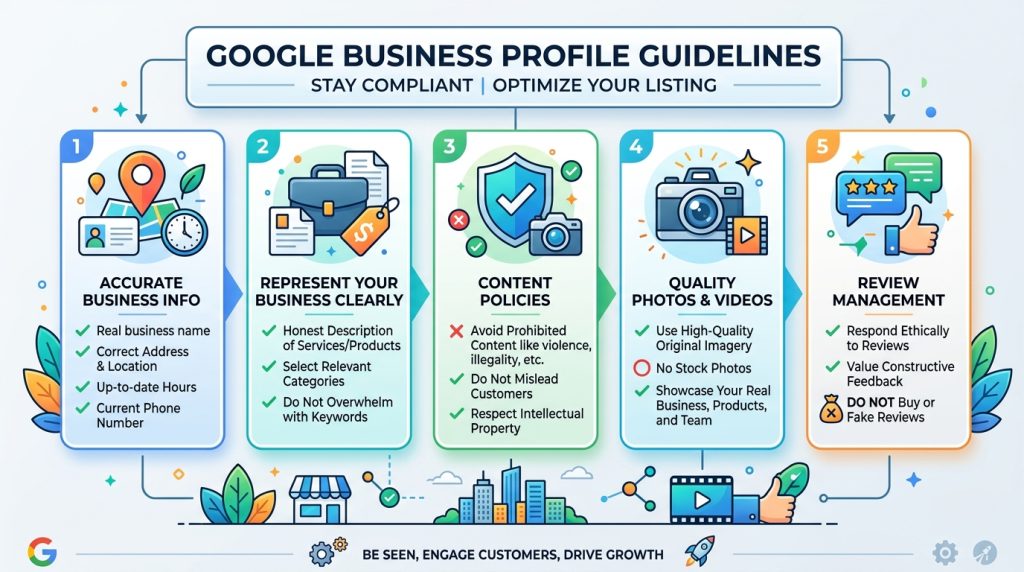
Who Is Eligible for a Google Business Profile?
Generally, your business is eligible if you:
- Have genuine, in-person contact with customers.
- Operate from a physical location customers can visit, or
- Travel to customers within a defined service area.
Eligible businesses include:
- Restaurants
- Retail stores
- Law firms
- Medical practices
- Salons
- Plumbers
- Electricians
- Contractors
- Hotels
- Professional service providers
Service-area businesses that visit customers instead of serving them at a storefront can also qualify.
Businesses That Usually Aren’t Eligible
Google generally doesn’t allow profiles for businesses that exist only online without direct, in-person customer interaction.
Examples may include:
- Online-only stores with no in-person service.
- Rental or for-sale properties.
- Lead generation companies that don’t represent a real business.
- Temporary events without an ongoing business presence.
If your business model changes over time, review Google’s eligibility requirements to ensure you still qualify.
Use Your Real Business Name
Your Business Profile should display your real-world business name.
Avoid adding extra keywords such as:
❌ Smith Plumbing | Best Emergency Plumber | Affordable Plumbing Services
Instead use:
✔ Smith Plumbing
Adding unnecessary keywords may violate Google’s policies and could result in edits being rejected or your profile being suspended.
Use a Real Business Address
Only use an address where your business actually operates.
Don’t use:
- Virtual offices that aren’t staffed during business hours.
- P.O. Boxes.
- Mailboxes.
- Addresses where your business doesn’t genuinely exist.
If you’re a service-area business that visits customers, you can hide your street address and display only your service area.
Choose Accurate Business Categories
Select the category that best describes your primary business activity.
For example:
- Dentist
- Bakery
- Roofing Contractor
- Auto Repair Shop
Add secondary categories only if they accurately represent additional services you offer.
Avoid choosing unrelated categories simply to appear in more searches.
Keep Your Information Accurate
Regularly update your:
- Phone number
- Website
- Business hours
- Holiday hours
- Address
- Services
- Products
Outdated information creates a poor customer experience and may reduce trust in your business.
Upload Authentic Photos
Photos should accurately represent your business.
Good examples include:
- Storefront
- Office
- Interior
- Team members
- Products
- Completed work
- Company vehicles
Avoid using misleading images or photos that don’t represent your business.
High-quality, original photos help customers understand what to expect.
Encourage Honest Customer Reviews
Customer reviews are an important part of your Business Profile.
Google encourages businesses to ask satisfied customers for honest feedback.
However, you should never:
- Buy reviews.
- Pay people to leave positive reviews.
- Post fake reviews.
- Ask employees to review your own business.
These practices violate Google’s policies and can damage your credibility.
Respond Professionally to Reviews
Whether a review is positive or negative, respond respectfully.
Professional responses demonstrate that you care about customer service and value feedback.
Avoid arguments, personal attacks, or sharing private customer information.
Don’t Create Duplicate Listings
Each eligible business location should generally have only one Google Business Profile.
Creating multiple profiles for the same business to gain extra visibility can lead to:
- Customer confusion
- Duplicate listings
- Suspensions
- Reduced visibility
If you discover duplicate listings, resolve them rather than maintaining both.
Follow Google’s Rules for Service-Area Businesses
If you travel to customers instead of serving them at your location:
- Set your service areas accurately.
- Hide your business address if customers don’t visit it.
- Don’t create separate profiles for every city you serve.
Your Business Profile should represent one legitimate business—not multiple versions of the same business.
Avoid Spam Tactics
Google actively works to prevent spam in local search results.
Avoid practices such as:
- Keyword stuffing
- Fake locations
- Multiple listings for one business
- Misleading business names
- False categories
- Fake reviews
These shortcuts may provide temporary gains, but they often lead to penalties or suspensions.
Keep Ownership Organized
Many businesses run into problems because multiple people create or manage different profiles.
To avoid confusion:
- Claim your Business Profile early.
- Add managers instead of sharing passwords.
- Remove access for former employees or agencies when appropriate.
- Keep ownership records current.
This makes it easier to manage your listing over time.
What Happens If You Break the Guidelines?
Depending on the issue, Google may:
- Reject your edits.
- Require additional verification.
- Reduce your profile’s visibility.
- Suspend your Business Profile.
- Remove your listing from Google.
If your profile is suspended, review the reason carefully, correct any issues, and follow Google’s reinstatement process.
Best Practices for Staying Compliant
From my experience helping businesses improve their online presence, most guideline problems aren’t intentional. They often happen because business owners don’t realize the rules or make changes without understanding how Google reviews listings.
To keep your profile in good standing:
✔ Use your real business name.
✔ Choose accurate categories.
✔ Keep your information current.
✔ Upload authentic photos.
✔ Collect genuine customer reviews.
✔ Respond professionally to feedback.
✔ Update your profile whenever your business changes.
✔ Review your listing regularly for accuracy.
These simple habits can help reduce the risk of policy issues while providing a better experience for your customers.
Frequently Asked Questions
Can I add keywords to my business name?
No. Your business name should match your real-world branding and signage. Adding unnecessary keywords solely to improve rankings violates Google’s guidelines.
Can I create multiple profiles for one business?
Generally, no. Each eligible business location should have one Business Profile unless Google’s guidelines specifically allow separate profiles, such as for distinct locations or eligible practitioners.
Can I use a virtual office?
In most cases, no. Your business should operate from the listed location during stated business hours. Addresses used only for mail or lead generation typically aren’t eligible.
Can I hide my business address?
Yes. Service-area businesses that visit customers can hide their address while displaying the areas they serve.
What if Google suspends my Business Profile?
Review the suspension notice, correct any guideline violations, gather any requested evidence, and submit a reinstatement request if you’re eligible.
Final Thoughts
Google Business Profile guidelines aren’t designed to make life difficult for business owners—they’re meant to ensure customers receive accurate and trustworthy information.
By representing your business honestly, keeping your profile up to date, and avoiding shortcuts such as keyword stuffing, fake reviews, or duplicate listings, you’ll build a stronger online presence while reducing the risk of suspension or rejected edits.
Treat your Google Business Profile as an extension of your business. Regular maintenance, accurate information, and compliance with Google’s guidelines will help customers find you with confidence and support your long-term local SEO efforts.
Leave a Reply